Welcome to TallyBoat Platform
Welcome to TallyBoat Platform
A connected business environment for the yachting ecosystem—bringing people, companies, yachts, operational workflows, documents, and financial activities together.
This guide introduces the TallyBoat vision, the people who use the platform, how its core entities fit together, and practical steps to begin working in your own business environment.
1. Welcome to TallyBoat: What Is the Platform?
TallyBoat is a cloud-based business platform designed to connect and coordinate work across the yachting industry. Business information, tasks, documents, partners, and financial records remain linked to the yachts and operations they relate to.
Through shared digital records and workflows, participants can reduce information fragmentation across email, spreadsheets, and disconnected applications. For a closer look at the structure and core concepts, continue with Understanding the TallyBoat Platform.
2. Who Can Use TallyBoat?
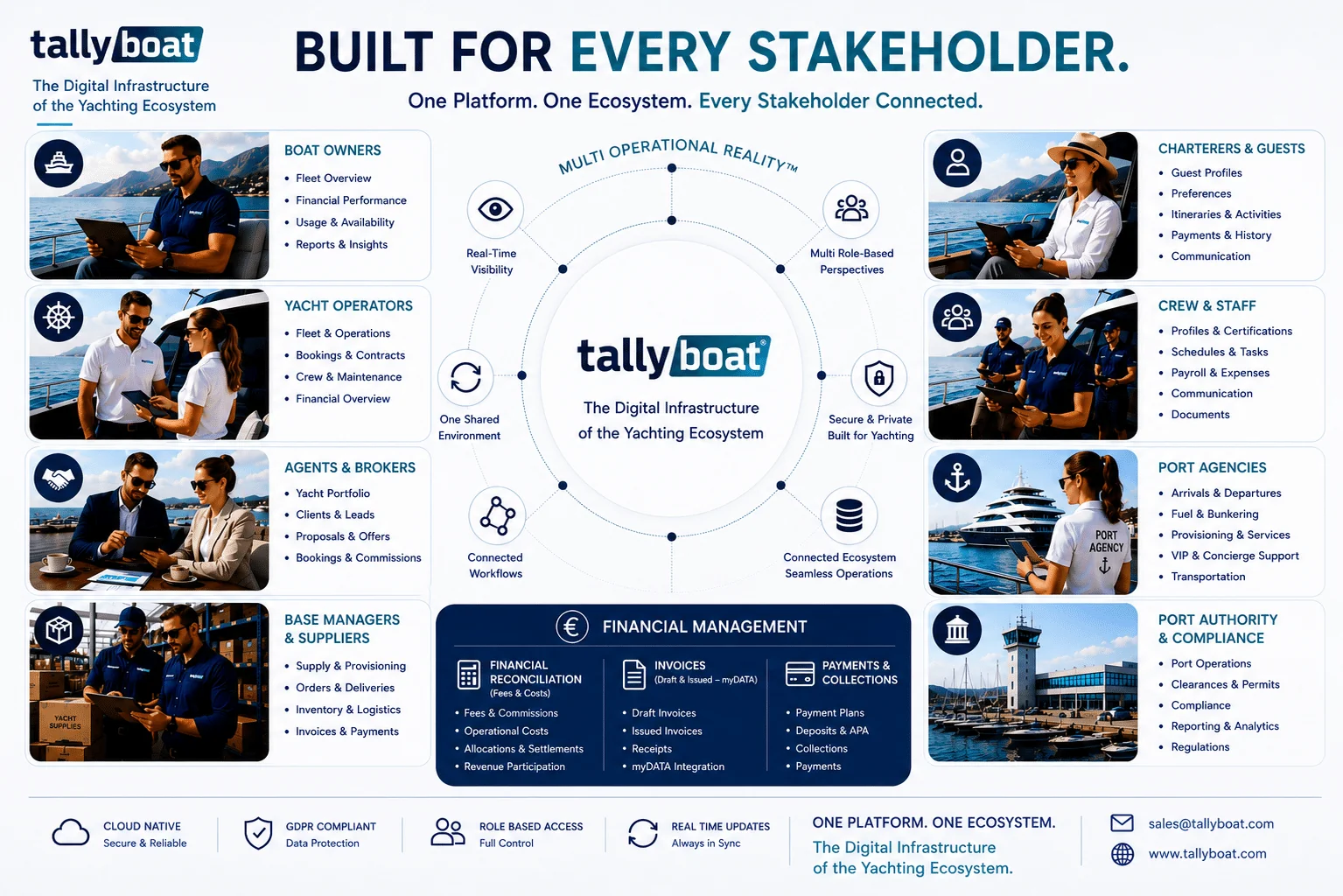
The platform serves the wider operational yachting ecosystem. Each participant works according to their role, business relationships, and access permissions.
Boat Owners
Manage yacht information and participate in activities connected to their vessels.
Yacht & Charter Managers
Coordinate yachts, charters, teams, documents, and day-to-day operations.
Brokers & Charter Agents
Manage commercial relationships, enquiries, bookings, and charter-related collaboration.
Port Agents & Marina Support
Support port calls, local arrangements, and operational coordination.
Technical Contractors & Service Providers
Contribute supplies, technical work, maintenance services, and related records.
Crew & Operations Assistants
Access the activities, information, and tasks relevant to their responsibilities.
Finance, Legal & Family Office Professionals
Participate in authorized financial, legal, and administrative processes.
Charterers & Guests
Interact with relevant charter information and guest-facing processes.
These roles work together across the wider TallyBoat Ecosystem, with each participant accessing the information and activities relevant to their involvement.
3. How Is the Platform Organized?
TallyBoat organizes personal access, professional identities, companies, and operational activities through a connected structure.
| Entity | Description |
|---|---|
| Account | Your personal access to the platform. |
| Profile | The identity and roles through which you participate. |
| Company | The business environment for a company and its authorized collaborators. |
| Boat | A yacht record and its connected information and activities. |
| Operational Activities | Charters, procurement, maintenance, documents, and financial processes. |
4. Multi Operational Reality™
A charter can involve a charterer, broker, operator, yacht owner, base manager, and external suppliers. They participate in the same business activity, but each has distinct responsibilities, permissions, and financial relationships.
The Multi Operational Reality™ architecture allows each participant to work from their own operational perspective while remaining connected to the shared activity. Read the dedicated guide to Multi Operational Reality™ to explore this concept in more detail.
5. What Can You Do with TallyBoat?
The platform combines capabilities that support daily organization, commercial activities, and financial coordination. Feature availability depends on platform configuration and user permissions.
Company & Team Management
Companies, profiles, user participation, and responsibilities.
Yacht Management & Documentation
Yachts, information, documents, and management activities.
Charter & Booking Operations
Enquiries, bookings, agreements, and charter coordination.
Procurement, Inventory & Maintenance
Supplies, procurement, maintenance tasks, and related records.
Financial Coordination
Invoicing, payment plans, payments, transfers, and reconciliation.
Collaboration & Workflows
Requests, tasks, documents, and collaboration between participants.
6. Your First Steps
Begin with your personal access and gradually explore the business environment relevant to your role.
- Access your Account.
- Review your Profile and responsibilities.
- Explore the Companies in which you participate.
- Get familiar with navigation and business records.
- Explore the modules relevant to your activities.
7. How to Use the Knowledge Base
Use the Knowledge Base to understand platform concepts, core entities, and business workflows. Begin with this overview, then explore the linked guides for more detail. As you work, follow the practical instructions and screenshots relevant to your tasks.